
An eSIM for travel is the simplest way to get mobile data abroad without paying your home carrier’s roaming rates or queuing for a local SIM card at the airport. You buy a data plan online, scan a QR code, and your phone connects to a local network the moment you land, while your usual number stays on your phone for calls and bank codes. This guide explains how it works, when it beats roaming or a local SIM, how to check your phone, how much data you really need and how to set it up without the common mistakes.
A travel eSIM is a digital SIM you download to your phone. It is usually data-only, works on phones that are unlocked and eSIM-compatible, and is best installed at home on Wi-Fi and switched on when you arrive. Most travelers need about 0.5 to 1 GB a day; video is what uses most. Inside the EU, a European plan already roams at no extra cost until 2032, so an eSIM matters most for trips outside your home roaming zone.
What is a travel eSIM and how does it work?
An eSIM is a SIM card built into your phone as a chip. Instead of inserting a plastic card, you download a “profile” from a mobile operator. Modern phones can store several profiles and use two lines at once, so you can keep your home line active for calls and texts while a travel eSIM handles data.
Travel eSIMs are sold by specialist providers that partner with local networks in each country. Most are data-only: you get mobile internet but no local phone number. WhatsApp, iMessage, FaceTime and other apps keep working with your usual number over that data connection.
eSIM, roaming or local SIM?
| Option | Price | Setup | Best for |
|---|---|---|---|
| Travel eSIM | Usually low | Online, before you leave | Short and medium trips, several countries |
| Home plan roaming | Free in your zone, often expensive outside | Nothing to do | Trips inside your roaming zone, very short stays |
| Local SIM card | Often cheapest per GB | Shop or airport, passport often needed | Long stays, when you need a local number |
Before buying anything, check what your own plan includes. Many carriers sell daily roaming passes or include some countries for free, and some plans now include data in popular destinations.
Is your phone compatible?
Two conditions must be met. First, the phone must support eSIM: most iPhones since the XS and XR, recent Google Pixel and Samsung Galaxy flagships, and a growing number of mid-range phones do. Second, it must be unlocked, meaning not tied to a single carrier.
- Look for an EID: on iPhone, go to Settings, General, About; on Android, Settings, About phone. A 32-digit EID number means the phone has an eSIM chip. On many phones, dialling *#06# also shows it.
- Check for a carrier lock: on iPhone, Settings, General, About shows “No SIM restrictions” when unlocked. Otherwise ask your carrier.
- US iPhones: all iPhone 14 and later models sold in the US have no SIM tray at all, so eSIM is the only option, which makes travel eSIMs very easy to add.
How much data do you need?
Data use depends on what you do, not on the country. Maps, messages and browsing use very little; video uses a lot. Netflix, for example, says standard-definition streaming uses about 1 GB an hour and HD up to 3 GB.
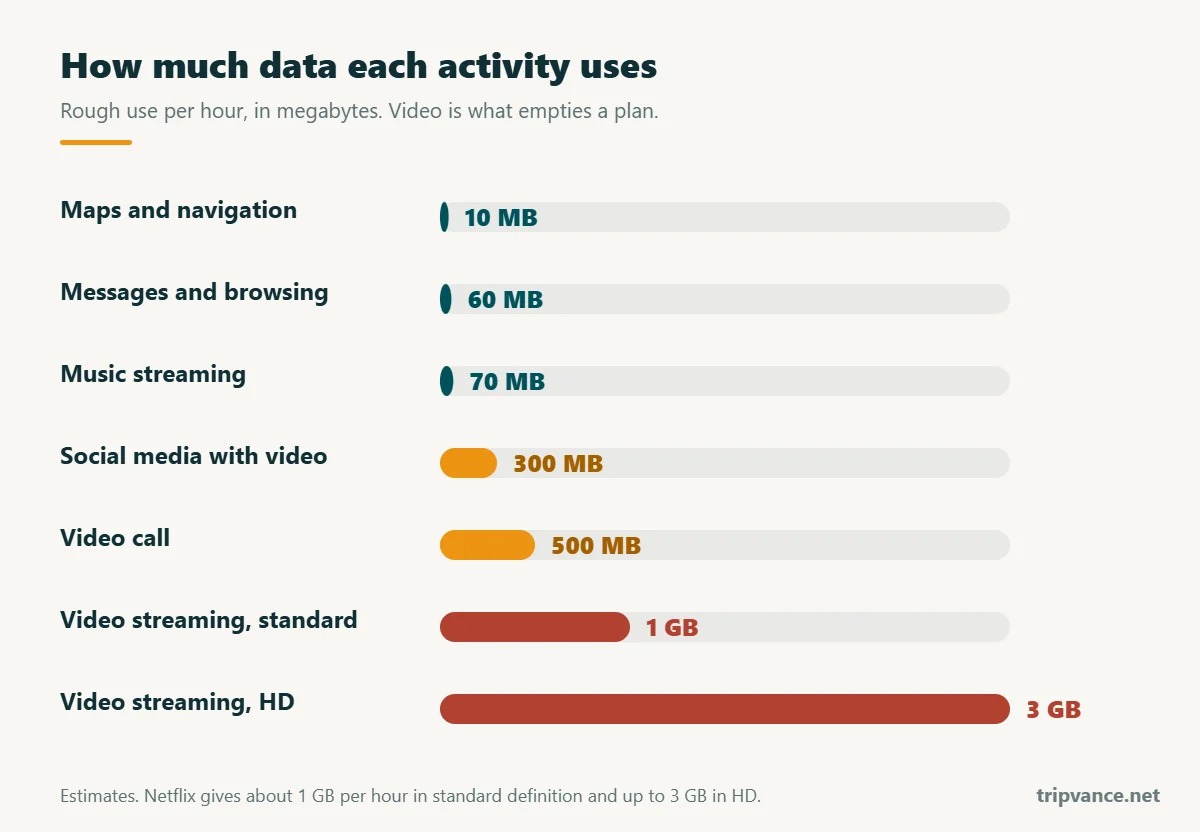
Two easy ways to need less: download offline maps for the cities you visit, and let photos back up to the cloud only on Wi-Fi.
How to set up a travel eSIM
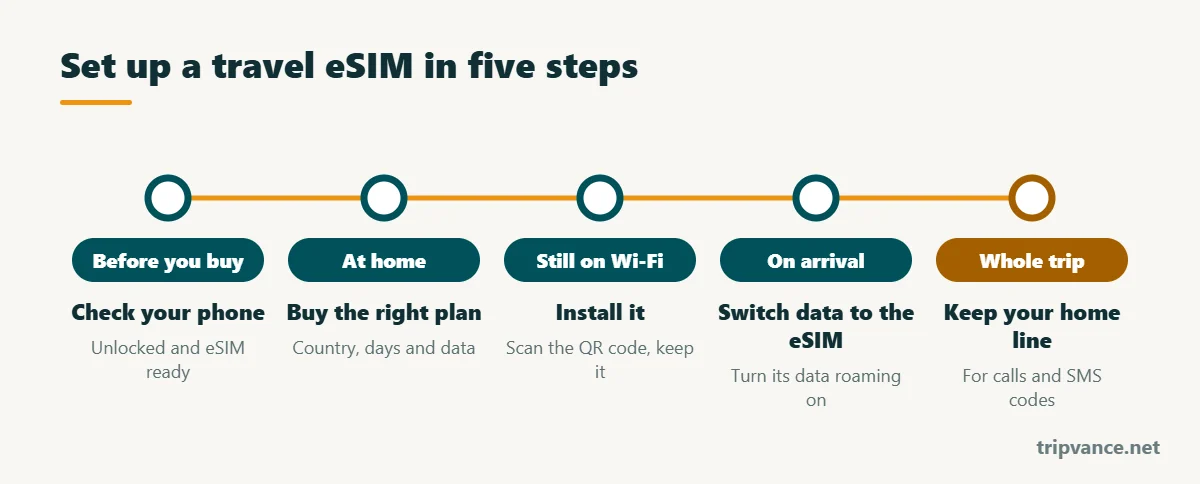
EID present and no carrier lock, as explained above.
Country or region, number of days and data. Check whether validity starts at installation or only when you first connect abroad.
Scan the QR code or use the provider’s app. Give the line a clear name, such as “Travel”, and never delete it during the trip: many eSIMs cannot be reinstalled.
Set the travel line for mobile data and turn on data roaming for that line only. Your phone joins a partner network within a minute.
Leave it on for calls and SMS codes from your bank, but turn its data roaming off so it cannot use data at roaming prices.
Roaming in Europe: do you even need an eSIM?
If your plan is from an EU country, the “Roam like at home” rules let you use your normal calls, texts and data in the other EU countries, Iceland, Liechtenstein and Norway at no extra charge, subject to fair-use limits. The rules apply until 30 June 2032, and since 1 January 2026 they also cover Ukraine and Moldova. Switzerland and the UK are outside these rules, so check your plan before crossing.
For a UK, US or Middle Eastern plan, or for a European traveler heading to Turkey, Morocco, Asia or the Americas, a travel eSIM is usually far cheaper than roaming. For a long stay where you need a local number, a local SIM or a local operator’s eSIM is often best: most countries require you to register it with your passport.
Mistakes to avoid
- Deleting the eSIM to “fix” a connection problem. Restart the phone and check the data line first.
- Forgetting to turn off roaming on your home line. Your phone can quietly use it for data.
- Trusting “unlimited” blindly. Many unlimited plans slow down after a daily amount. Read the fair-use line.
- Assuming hotspot works. Some plans block sharing your connection with a laptop.
- Installing on the day you fly. If the QR code needs Wi-Fi and the airport network is slow, you lose time when you need data most.
Bring a small power bank: a phone used for maps and photos all day empties fast. Check what you can carry on board in our guide to power banks on planes, and add the eSIM QR code to your international travel checklist.
Frequently asked questions
Do I keep my phone number with a travel eSIM?
Yes. Your home SIM or eSIM stays installed. You can still receive calls and texts on it, and apps like WhatsApp keep your usual number.
When should I install a travel eSIM?
At home, a day or two before you leave, while you have reliable Wi-Fi. Then switch it on when you land.
Can I use an eSIM in several countries?
Yes, with a regional plan covering Europe, Asia or the Middle East, for example. Check that every country on your route is listed.
Can I make normal phone calls with a travel eSIM?
Most travel eSIMs are data-only. Use internet calls through apps, or choose a plan that includes a local number.
Is a travel eSIM safe?
Yes. It is a standard operator profile. It is generally safer than open public Wi-Fi, which you should use with care.
How much data do I need for a week abroad?
For maps, messages, social media and a few calls, 3 to 5 GB is usually enough. Add much more if you stream video.
Last updated: November 2026. Prices and coverage of eSIM plans change often: check the network, speed and validity rules before buying.