
A good travel itinerary template does one job: it puts everything you need for each day of a trip on one line, so you never dig through emails at a check-in desk. Below you get a free template you can copy straight from this page, print, or rebuild in Google Sheets, Google Docs or Excel in about ten minutes. We also cover what to put in it, the mistakes that make itineraries fail on the ground, and how to prepare one for a visa application.
What you get here
- A day-by-day template with date, city, morning, afternoon, evening, transport, stay, confirmation number and notes.
- A trip overview block for flights, lodging, insurance and emergency contacts.
- Step-by-step setup for Google Sheets, Docs and Excel: frozen header, status dropdown, color rules.
- Planning rules that make an itinerary work: buffers, opening days, time zones.
- What consulates usually expect in a travel itinerary for a visa, and why fake bookings are a bad idea.
What a good travel itinerary contains
Most itineraries fail in one of two ways. Either they are a wish list with no logistics (twelve sights, no idea how to get between them) or a pile of bookings with no plan. A useful itinerary sits in between: one row per day, with where you sleep, how you move and what you will actually do.
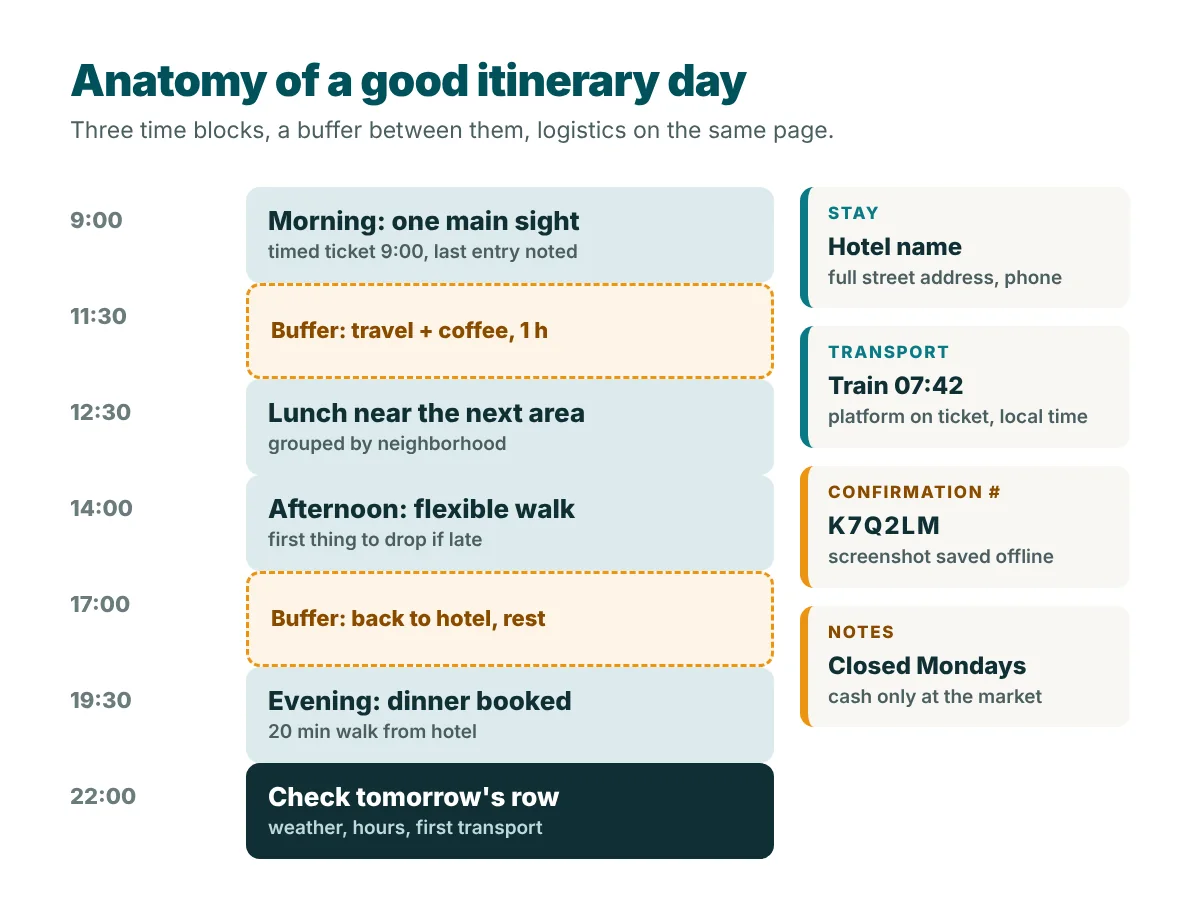
Every day needs these fields:
- Date and day of the week. The weekday matters because museums, markets and restaurants close on fixed days.
- Base city. Where you wake up and where you sleep, if different.
- Morning, afternoon, evening. One main activity per slot is plenty. Three slots force you to be realistic.
- Transport. Flight, train, car or transfer, with the departure time.
- Stay. Hotel name and address, written the way a taxi driver can read it.
- Confirmation number. The single most useful field when something goes wrong.
- Notes. Check-in time, ticket entry time, a reminder to buy water before the desert road.
Free travel itinerary template (copy or print)
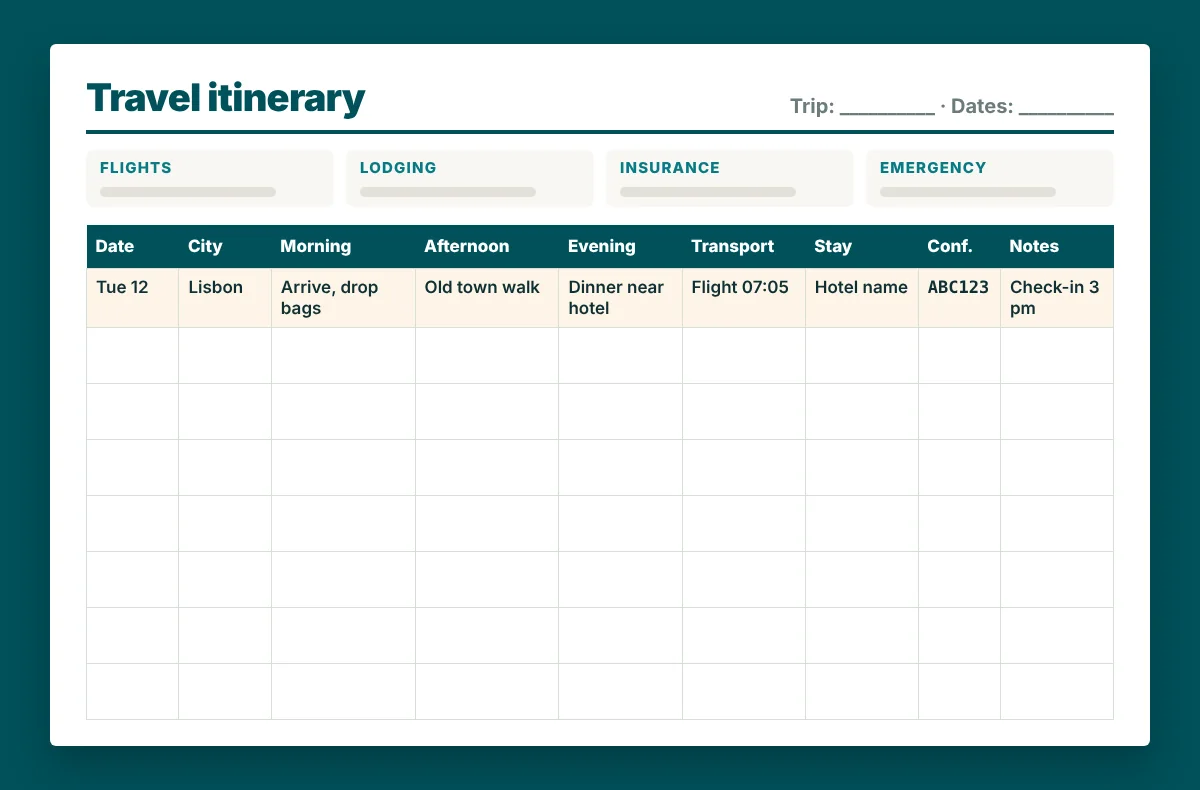
Here is the day-by-day template. The first row is filled in as an example so you can see the level of detail that helps. Select the table, copy it, and paste it into Google Sheets, Excel or Docs: the columns stay in place. To print it, paste it into a document set to landscape.
| Date | City | Morning | Afternoon | Evening | Transport | Stay | Conf. # | Notes |
|---|---|---|---|---|---|---|---|---|
| Tue 12 May | Lisbon | Arrive 9:40, drop bags | Old town walk, castle visit (check last entry) | Dinner near hotel, early night | Flight 07:05, airport metro | Hotel name, street address | ABC123 | Check-in from 3 pm |
Printed on one landscape page, it looks like this:
The trip overview block
The daily grid tells you what happens each day. The overview tells you everything that applies to the whole trip. Put it on top of the first page or in a separate tab called “Overview”, and fill it in before the day rows.
| Item | What to write |
|---|---|
| Travelers | Full names as on passports, dates of birth if traveling with children |
| Flights | Airline, flight number, date, departure and arrival time (local), booking reference |
| Lodging | Each hotel with dates, address, phone, booking reference, cancellation deadline |
| Ground transport | Car rental, rail passes, airport transfers, with pick-up times and references |
| Insurance | Insurer, policy number, 24-hour assistance phone number |
| Documents | Passport expiry dates, visa numbers, where the copies are stored |
| Emergency | Local emergency number, your embassy or consulate, one contact at home |
| Money | Cards you bring, the bank’s phone number from abroad, daily budget |
Write cancellation deadlines next to each hotel. Free cancellation is only useful if you remember the last day you can use it.
How to set up the template in Google Sheets
A spreadsheet is the best format for an itinerary you will edit many times, because rows are easy to move and you can share one live file with everyone on the trip. These are the steps we use, with menu names as they appear in Google Sheets in October 2026.
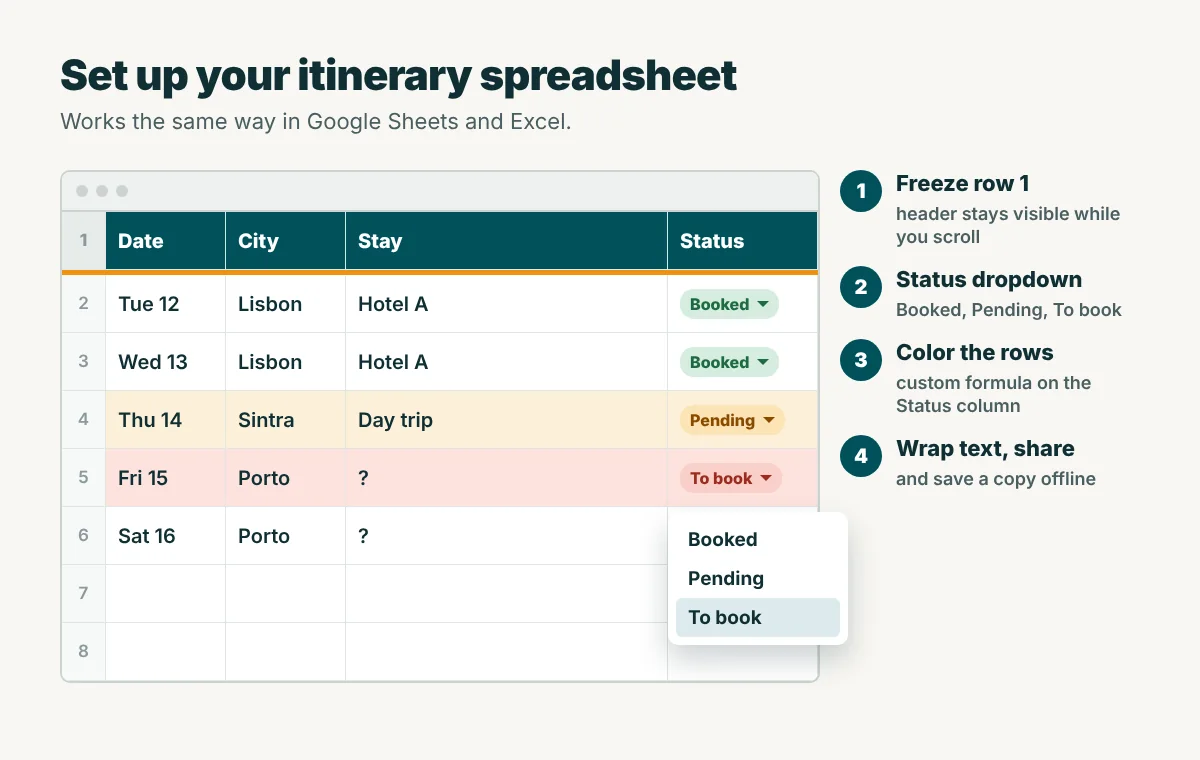
- Create the columns. In row 1 type: Date, City, Morning, Afternoon, Evening, Transport, Stay, Conf. #, Status, Notes. Make the row bold with a fill color.
- Freeze the header. Select row 1, then View, Freeze, 1 row. The column names stay visible while you scroll through a long trip.
- Format the date column. Select column A, then Format, Number, and choose a date format that shows the weekday, or a custom format like “ddd d mmm”.
- Add a status dropdown. Select the Status column, then Insert, Dropdown (or Data, Data validation, Add rule). Create three options: Booked, Pending, To book.
- Color by status. Select the data rows, then Format, Conditional formatting. Choose “Custom formula is” and enter
=$I2="To book"with a light red fill. Add a second rule for “Pending” in amber. The whole row now changes color when you update the status. - Wrap the text. Select everything, then Format, Wrapping, Wrap, so long notes stay readable.
- Share it. Use the Share button and give your travel companions edit access. Download the sheet for offline access on your phone before you leave.
Excel version
The same steps work in Excel with different menu names. Freeze the header with View, Freeze Panes, Freeze Top Row. Build the dropdown with Data, Data Validation, Allow: List, and type Booked,Pending,To book as the source. Color rows with Home, Conditional Formatting, New Rule, “Use a formula to determine which cells to format”. Turning the range into a table (Insert, Table) adds filters and banded rows for free.
Google Docs or Word version
A document is better for an itinerary you will print or send as a PDF. Insert a table with 9 columns, set the page to landscape (File, Page setup in Docs, or Layout, Orientation in Word) and repeat the header row on every page. In Docs, right-click the table, open Table properties and pin the header row. In Word, select the first row and choose Repeat Header Rows from the Layout tab.
Planning rules that make an itinerary work
A template only helps if what you put in it is realistic. These rules prevent most of the problems we see in itineraries.
- Leave buffers. Keep at least an hour between activities in different parts of a city, and a free half day after a long-haul flight. Arrival days almost always run late.
- Check opening days and hours. Many museums close one day a week, and last entry can be an hour before closing. Write the hours in the Notes column.
- Use local time everywhere. Airlines print departures and arrivals in local time. Write every time in your itinerary the same way, and note the time difference on the overview.
- Group by area. Put sights that are close to each other on the same day. It saves hours of transport.
- Mark fixed and flexible items. A timed ticket is fixed. A walk is flexible. When a day goes wrong, you know what to drop.
- Keep one copy offline. A PDF on your phone plus one printed page in your bag. Signal and batteries fail at the worst moments.
Planning a driving trip? Our guide on how to plan a road trip adds the driving hours and fuel budget columns that a road itinerary needs.
Travel itinerary for a visa application
Many embassies ask for a travel itinerary as part of a visa file, especially for Schengen visas. In that case the itinerary is not a planning tool, it is evidence. It has to match every other document in the file: dates, cities, hotels and flights.
Requirements differ between countries and consulates, so always use the checklist of the consulate where you apply. As an example, the Schengen checklist published by the Czech Ministry of Foreign Affairs asks for:
- A full travel itinerary.
- A copy of a round-trip flight ticket or a flight reservation with a valid reservation code, plus your means of transport between Schengen countries if you visit more than one.
- Proof of accommodation covering the whole stay (hotel reservation, prepaid booking or a host’s confirmation).
- Travel medical insurance valid in all Schengen states for the whole stay, with at least €30,000 of cover.
The European Commission says you should apply at least 15 days before the trip and no earlier than 6 months before it, and that the consulate may ask for more documents.
How to format a visa itinerary
Keep it simple: your full name and passport number at the top, then one line per day with the date, the city, the hotel name and address, and how you travel between cities. Leave out restaurants and sightseeing details. The visa officer is checking that your plan is coherent and that you have somewhere to sleep every night.
Do not use invented hotel confirmations, edited tickets or “dummy” reservations that are cancelled after the appointment if the consulate asks for real ones. Consulates can check bookings, and false documents can lead to a refusal and problems with future applications. If you do not want to pay before the decision, use refundable rates and ask the consulate what kind of reservation it accepts.
For the rest of the paperwork (passport validity, copies, insurance), see our international travel checklist.
How tour operators send itineraries to clients
If you book a guided tour or a tailor-made trip, the itinerary usually arrives in two forms. Before you book, it is a day-by-day description on the company’s website: the route, what is included, the meals and the type of lodging. After you book, you get a final document with exact times, the guide’s or driver’s phone number, hotel names and booking references.
Compare the two before you leave. If a hotel or an activity changed between the website version and the final one, ask why. A good operator explains changes without being asked. It is also worth copying the operator’s final version into your own template, so your personal plans and the tour sit in one place.
For travel companies, publishing clear day-by-day itineraries on their own website is one of the most useful things they can do for customers. Tools built for tour businesses, such as the Tripvance plugin for WordPress, help them present those days in a consistent format.
Using your itinerary during the trip
The template is not finished when you leave home. Spend five minutes each evening looking at tomorrow’s row: check the weather, the opening hours and the first transport time. Update the Status column when you change something, and add the confirmation number of anything you book on the road.
After the trip, keep the file. Your notes on what took longer than expected are the best possible input for the next itinerary. Pair it with our packing list for travel and you have a reusable system for every trip.
Travel itinerary template: frequently asked questions
What should a travel itinerary include?
For each day: the date, the city, your main activities by time of day, transport with times, where you sleep, booking confirmation numbers and short notes. On top, a trip overview with flights, lodging, insurance and emergency contacts.
Is there a free travel itinerary template in Google Sheets?
Yes, you can build one in a few minutes. Copy the table in this article, paste it into a new Google Sheet, freeze the first row and add a status dropdown. The steps above show each menu.
Is Excel or Google Sheets better for a travel itinerary?
Google Sheets is easier when several people plan together, because everyone edits the same file. Excel works well if you plan alone and prefer working offline. The template is the same in both.
Can I make a travel itinerary for a visa without booking?
Some consulates accept reservations that are not yet paid, others ask for confirmed bookings. Check the checklist of the consulate where you apply. Use refundable rates if you do not want to pay in full before the decision, and never submit fake documents.
How detailed should an itinerary be?
Detailed on logistics, light on activities. Times, addresses and confirmation numbers should be exact. Sightseeing should be one main item per morning, afternoon and evening, so there is room for surprises.
Last updated: October 2026